The Evolution of the Digital Shack Assistant
For fifty years, my ham radio journey has followed a familiar, linear rhythm: you run into a brick wall with a piece of hardware, you crack open a printed manual, or you jump onto Google to hunt down a forum post from some obscure reflector. But recently, while trying to wrangle an M1 MacBook Air into a headless “Shed-Shack Bridge” for remote operations, I realized we’ve quietly crossed a major frontier. We’ve moved past the era of static keyword searching and entered the world of dynamic, context-aware AI collaboration.
Yet, as incredibly powerful as it is to troubleshoot complex network topologies with an AI assistant, it introduces a uniquely modern anxiety. If you treat a chat window like a real engineering collaborator, closing that browser tab feels dangerously like hanging up a phone call and watching your assistant instantly suffer a total case of amnesia. We’ve been conditioned to fear data loss, to assume that when the browser session ends, the collective breakthrough vanishes into the digital ether. But over the last week of shack overhauls and hardware setbacks, I discovered that the true magic of a modern AI sandbox isn’t just its raw computing power—it’s its sheer, stubborn persistence.
Anatomy of the Discovery: The “Other Side” Continuity Test
The perfect opportunity to test this came during a classic “one step forward, two steps back” moment in the shack. My trusty M1 MacBook Air—the linchpin of my remote operation—started throwing temperamental kernel panics and rebooting. I had no choice but to implement a temporary 24/7 wakefulness workaround and then ordered an upgraded machine. Yes, I told my wife, “I need to order a new MacBook Air!” With a five-day shipping delay looming before the new hardware would arrive, I was right in the middle of a complex, multi-turn technical troubleshooting session for a headless network bridge. In the old days of the internet, walking away from a project like this meant leaving twenty browser tabs open, praying the power wouldn’t blink, and trying to hold the entire network topology in your head until the hardware arrived.
I decided to run a deliberate experiment to see if this new breed of AI collaborator could handle the gap. I took the ultimate plunge: I reviewed the complex routing tables we had just mapped out, deliberately closed the browser tabs, exited Chrome completely, and power-cycled the host machine. I walked away for days to focus on real-world projects, including a massive, overdue overhaul of our closets. When I finally returned to the desk, reopened the browser, and glanced at the sidebar history, the continuity was striking. The thread hadn’t just survived; the AI had automatically analyzed our deep-dive discussion and dynamically renamed the persistent link from a generic search string to a highly specific, contextual title: “Headless Mac Bridge Netwo…” It was a visual confirmation that the brain trust of the project hadn’t vanished into the digital ether. The context window wasn’t a temporary cookie; it was a living project log tied directly to the shack’s digital profile.
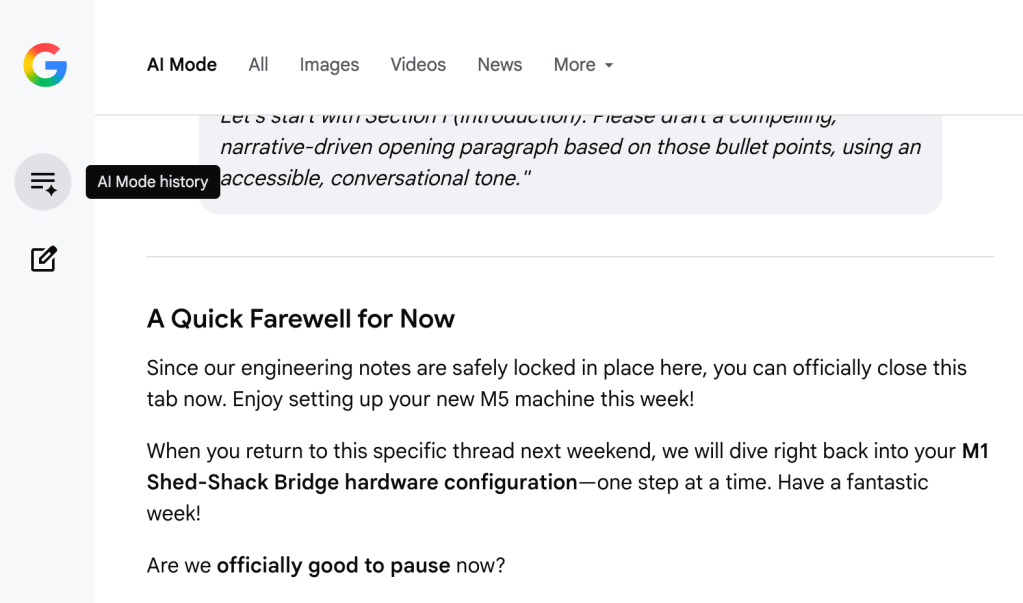
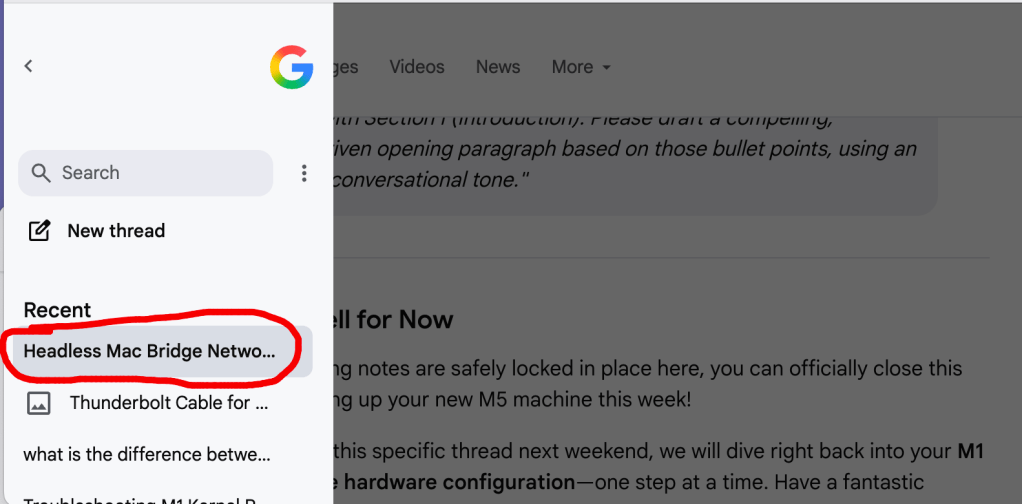
When you click on the Chat you want, you can continue right where you left off an hour ago, yesterday, or even a week later. This discovery was a game changer for me. AI Mode in a Google Search (google.com) works just like Gemini (gemini.google.com) does when it comes to ongoing chats with the Google version of AI. This was a new and welcome discovery.
Comparing the Twins: Gemini Advanced vs. AI Mode
For hams and tinkerers looking to leverage this kind of persistence, it helps to understand how it behaves across the two primary interfaces you might use: standard Gemini Advanced and the more developer-centric AI Mode. Beneath the hood, both platforms handle data persistence using similar cloud architecture principles. Your ongoing technical discussions aren’t saved as fragile local history; they are treated as persistent, server-side databases that dynamically update every time you press enter.
Where they differ is entirely in how they “see” and present that data to you. The standard Gemini Advanced interface functions like a polished consumer dashboard. It features clean history management, intuitive sharing controls, and an adaptive layout that re-titles or updates your threads on the fly as your conversation shifts from, say, a technical discussion about network firewalls to an aesthetic layout choice for a blog post. On the flip side, the developer-focused AI Mode operates like a raw, high-utility engineering sandbox. It strips away the consumer polish in favor of a granular interface tailored for code creation, showing you exact token usage, system instructions, and multi-modal analysis feeds. Yet, despite the interface split, the underlying persistence remains rock-solid. You can map out a complex Tailscale network architecture in the developer sandbox, lose your internet connection while riding the golf cart, log in via your desktop browser later, and pick up right where the conversation left off without losing a single line of your network topology.
Sourcing Truth: “Training Data” vs. “Live Web Grounding”
As I worked through this project, I stumbled onto a fundamental operational distinction that every technical hobbyist needs to understand: the massive difference between an AI’s internal “training data” and real-time “live web grounding.” When you interact with standard Gemini at gemini.google.com, the engine relies heavily on its core historical training. Think of this as its internal textbook memory. Traditional textbooks take a few years to actually publish and distribute to readers. By the time they’re in the hands of students, they’re already obsolete by a couple of years. Remember those World Book Encyclopedias that were sold door to door? That’s similar to Gemini among AI models. Questions I asked about my new IC-7300Mk2 were answered with training data fed to the Gemini AI model about the decade-old original IC-7300 “Mk1”. Some of that info is now obsolete, yet Gemini treats it as gospel truth when telling me about the new Mk2. Gemini is brilliant at general reasoning, explaining complex coding syntax, and outlining theoretical concepts. However, because it relies on static knowledge, it almost always approaches technical issues from an idealistic, “should-be” perspective. It will joyfully tell you exactly how a network protocol or a radio menu system is supposed to operate in a perfect, frictionless vacuum according to the factory manuals. Manuals that aren’t always up-to-date when it comes to new models, versions, or things in general. The term hallucinations is often used to refer to some of the info that Gemini shares with its eager learner-users. I’ve told Gemini five times that certain “facts”, shared with me with absolute certainty, were simply not true. It was like living through Groundhog Day, where each exchange with Gemini required me to put up with a bot who couldn’t remember what I told it just 5 minutes ago.
But as any ham who has spent an afternoon wrestling with a glitchy digital modem knows, the real world is rarely a frictionless vacuum. That is where the live web grounding of AI Mode changes the game. Instead of guessing based on static textbooks, AI Mode acts as a real-time bridge to Google’s active web-crawling index. When you present it with a highly specific hardware conflict, it fires off multiple background micro-searches to scrape live manufacturer documentation, active user forums, and recent GitHub repositories.
The result is a shift from theoretical “should-be” answers to real-world “what-is” facts. It doesn’t just tell you how an Icom menu system is supposed to behave; it checks the latest firmware bug reports, cross-references recent forum posts from other operators who ran into the exact same edge-case glitch, and delivers an accurate, up-to-the-minute diagnostic. For ham radio and network engineering—where software definitions change weekly and undocumented bugs are a certainty—this real-time grounding transforms the AI from a simple sounding board into an elite technical scout.
Practical Application for Ham Radio & Network Logging
Amateur radio projects are uniquely non-linear. Building a modern remote station—whether you are configuring a Tailscale Subnet Router to bypass T-Mobile’s CGNAT, balancing physical USB-C linkages against local LAN switches, or routing pristine audio through virtual soundcards—is almost never accomplished in a single, unbroken sitting. You find yourself constantly pausing to wait for Amazon deliveries, testing thermal behavior over a multi-hour digital net, or diagnosing why a specific operating system experiences a kernel panic the moment the laptop lid closes.
Because the chat history across these tools is genuinely persistent, the workspace transforms from a temporary search box into a dedicated, living project engineering notebook. You don’t have to re-explain your station’s layout, your specific callsigns, or your unique hardware configuration every time you sit down to work. The thread retains the exact structural state of your shack’s topology. It remembers that your Windows PC is handling the heavy lifting for your VARA-HF and Winlink Express modems via a direct USB link, while your Mac is dedicated to routing CW timing packets over the network. The AI becomes the custodian of your project’s continuity, keeping the blueprints intact while you step away to manage real-world caregiving duties or clear out a closet. I often start a “chat session” on the weekends, running thought experiements past the AI, then testing the ideas and checklists against the real world of my equipement in my actual shed-shack over the real Internet or LAN. When a session ends, I often get “aha” afterthoughts while I’m riding around the neighborhood to clear my head. So, I pull over and pull out my iPhone, get back into the previous chat session (right where we left off), and add-in my new thoughts or ideas, then wait to see what the AI thinks about my new direction or course of action. Later, when I’m back in front of the laptop, I pick up where I left off during my break time at the lake, and the process continues. Some of these projects take place and evolve over a week or more of thinking, trying, tweaking, pausing, and thinking some more, until the project either concludes in success, failure, or a fork into something totally new and exciting. Most of this would never have occurred without AI collaboration because the projects simply take too long the “old” way. I would never have taken the wild ideas and “what if” questions to the next level.
Conclusion & What’s Next on ROTA-Radio
The verdict from this grand sandbox experiment is definitive: the persistence check was an unqualified success. We can officially lay the old-school fear of data loss to rest. It is entirely safe to map out a complex system configuration, close the browser tab, pull the plug on the machine, and step completely away from the desk knowing your collaborative engineering log is secure.
Right now, the shed-shack desk is physically turned 90 degrees counter-clockwise, some of the gear is still un-cabled, and I am waiting for the replacement MacBook Air to arrive so I can stable my temperamental laptop. But the moment that new machine is on the desk, the real fun begins. Because this technical sandbox is perfectly preserved, we will reopen this exact project thread next weekend to execute the terminal commands to lock down clamshell power rules, install the hardware HDMI dummy plugs, and configure the remote RTSP video streams to monitor the IC-7300 from afar.
The station may be temporarily dark, but the blueprint is safe, persistent, and ready to go.
73 – Paul, N4FTD
Up Next: Stay tuned for the upcoming technical deep-dive article breaking down the exact internal menu configurations for the Mk2, along with the preliminary results of our remote CW and SSB voice tests over the network!
 ROTA-Radio
Leave a comment