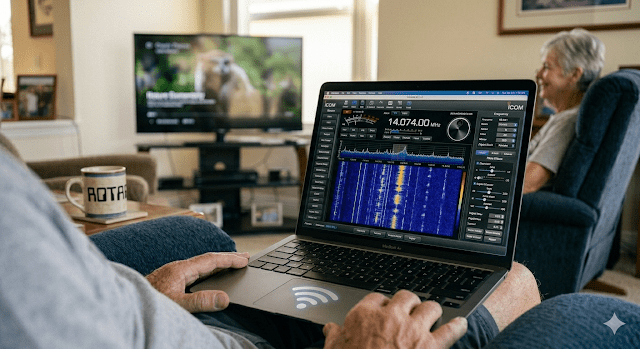
If “The Radio Engine” (the IC-7300MK2) is the heart of this station, the laptop is the nervous system.
The goal of ROTA was never just to move a radio; it was to move the experience of radio. To do that, I needed a “Digital Tunnel” that could carry high-fidelity audio and CAT control signals from the shed into the living room without adding latency or—more importantly—noise.
The Silicon: Silent & Stealthy
Whether I am using the M1 MacBook Air or the Dell Latitude, the laptop serves as a silent partner in the living room. The M1, in particular, is a game-changer for Parallel Play. Because it’s fanless, there is no “jet engine” noise to compete with the TV or Sue’s conversation. It sits on my lap, stone-cold, while it processes the high-speed waterfall data coming off the 7300.
The Digital Plumbing: Bridging the Gap
To make this work, I rely on a few key pieces of software that act as the “valves” in my digital plumbing:
- RS-BA1 V2: This Window app is the primary remote control software for the Dell. It allows the laptop to “talk” to the IC-7300MK2 over the LAN as if it were plugged directly into the back of the rig. Only, it happens wirelessly via the router’s WiFi. Icom’s RS-BA1’s companion app is the Icom Remote Utility. This simple utility creates a virtual COM port through which all of my digital apps connect to the LAN so they can reach the MK2 remotely. For digital modes, the RS-BA1 V2 app isn’t really needed. Apps like FLRig do almost the same things. Keyboard chatting or messaging apps like JS8 and VarAC can connect to FLRig. From there, FLRig uses the COM port assigned by Icom Remote Utility. Now, my CAT signals and audio can pass straight to the back of my Icom-7300 MK2 using the LAN.
- VARA HF & Winlink: For emergency prep and digital messaging, these tools are essential. They allow me to send and receive radio-enabled email via RF while sitting comfortably in the recliner. All digital modes are done on the Dell laptop. They’re virtually silent as I sit in my recliner across the living room from my wife.
- SDR-Control: This Mac-only software works great with my M1 MacBook Air. In the shed-shack, I use its waterfall on a 32″ LG 4K display. Built-in “Tools” help when I hunt POTA stations, reply to CQs, or manage log my QSOs using the built-in Logger. While I operate digital modes on a Dell laptop with Icom Remote Utility, SSB and CW are supported by the Mac. Long-term, I’ll add additional USB hardware like WinKeyer which will allow me to operate (especially) CW from the Recliner. CW is almost as quiet (to my wife) as my fingers typing out messages for digital modes.
- The Waterfall on SDR-Control: Having a high-resolution display on the laptop means I can “see” the band better than I ever could on the small screen of the radio itself. If I’m sitting in the laptop and want to remain quiet so my operating doesn’t spoil the TV show my wife is watching, I can put on my headphones, click on strong signals on the waterfall, and go into SWL (listener) mode by eavesdropping on an SSB conversation. If I really want to talk, I can just pick up the laptop and sit on the screen porch a few feet away. It’s like stepping outside to chat on the phone so you don’t bother your family members who are watching TV.
The Comfort Factor
Operating from the laptop means I’m no longer tethered to a desk. I can chase a POTA activator or chec into a regional net while remaining physically present.
This setup proves that you don’t need to be surrounded by glowing tubes and tangled wires to be a “real” operator. Sometimes, the best station is the one that fits into your life, not the one you have to escape to while leaving the family behind.
📡 The ROTA Journey Continues… Ready to configure your own remote station? Here is the step-by-step sequence.
 ROTA-Radio
Leave a comment